
Episode 1: Hunting Deprecated Lambda Runtimes - Before They Become Problems
Tarek Cheikh
Founder & AWS Cloud Architect

The Manual Runtime Tracking Problem
Across many organizations, tracking Lambda runtime versions remains a surprisingly manual process. Some teams rely on basic AWS CLI commands like aws lambda list-functions, but this approach has significant limitations:
- Single region scope: The basic CLI command only checks one region at a time
- No deprecation context: Raw function lists don't indicate which runtimes are deprecated
- Manual correlation: Teams must manually check each runtime against AWS deprecation schedules
- Time-intensive: Checking 15+ regions individually becomes a multi-hour task
- Error-prone: Human oversight inevitably misses functions in less-used regions
The reality is that most organizations discover deprecated Lambda runtimes reactively — during security audits, compliance reviews, or when AWS support notices flag potential issues. By then, they're playing catch-up with potentially dozens of functions requiring urgent migration.
The fundamental challenge: AWS provides the data, but not in a format that scales for comprehensive runtime management across enterprise environments.
Why Lambda Runtime Management Matters
When AWS deprecates a Lambda runtime, they stop applying security patches and providing support. But here's what many teams miss: your existing functions continue running on the deprecated runtime indefinitely.
AWS doesn't force upgrades. They simply stop maintaining the underlying runtime environment. This creates a growing attack surface as security vulnerabilities in deprecated runtimes remain unpatched.
Looking at AWS's actual deprecation timeline reveals the scope of this challenge:
- Python 3.7: Deprecated July 2022
- Node.js 12.x: Deprecated April 2022
- Python 3.6: Deprecated July 2021
- .NET Core 2.1: Deprecated January 2021
The pattern is clear: AWS maintains runtimes for approximately 2–3 years after release, then provides 6–12 months notice before deprecation. For teams managing hundreds of Lambda functions, staying on top of these timelines manually is nearly impossible.
Building the CLI Solution
Observing these manual tracking challenges across organizations led to building a comprehensive automation tool. The key insight was making it dynamic — instead of hardcoding deprecation dates that quickly become outdated, the script fetches current runtime information directly from AWS documentation.
Dynamic Runtime Detection
def fetch_runtime_information():
    """Fetch current runtime status from AWS Lambda documentation."""
    url = "https://docs.aws.amazon.com/lambda/latest/dg/lambda-runtimes.html"
    response = requests.get(url, headers=headers, timeout=30)
    soup = BeautifulSoup(response.content, 'html.parser')

    # Parse AWS documentation tables for current runtime status
    # This ensures we always have the latest deprecation information
This approach means the tool automatically stays current with AWS announcements without requiring code updates.
Multi-Region Discovery
The script systematically scans all AWS regions where Lambda is available:
def scan_lambda_functions_in_region(region, at_risk_runtimes):
    lambda_client = boto3.client('lambda', region_name=region)
    at_risk_functions = []

    paginator = lambda_client.get_paginator('list_functions')
    for page in paginator.paginate():
        for function in page['Functions']:
            runtime = function.get('Runtime', 'N/A')
            if runtime in at_risk_runtimes:
                at_risk_functions.append({
                    'function_name': function['FunctionName'],
                    'runtime': runtime,
                    'deprecation_date': runtime_info['deprecation_date'],
                    'last_modified': function['LastModified'],
                    'region': region
                })

    return at_risk_functions
Smart Risk Prioritization
Not all deprecated runtimes pose the same urgency. The tool categorizes findings based on timeline:
- CRITICAL: Already deprecated (immediate attention needed)
- HIGH: Deprecating within 90 days (migration planning required)
- MEDIUM: Deprecating within 6 months (monitoring needed)
Enhanced CLI Performance
The CLI tool now includes parallel processing capabilities that dramatically improve scanning performance across multiple regions. When scanning all AWS regions, the tool automatically uses parallel processing with configurable worker threads, resulting in 85–90% faster execution compared to sequential scanning.
Running the Scanner
# Clone the repository
git clone https://github.com/TocConsulting/aws-helper-scripts.git
cd aws-helper-scripts/aws-deprecated-lambdas-runtime

# Quick scan of current region (sequential processing)
./detect_outdated_lambda_runtimes_cli.py

# Fast multi-region scan with parallel processing (default: 5 workers)
./detect_outdated_lambda_runtimes_cli.py --all-regions --months 12

# Optimized scan with maximum performance (15 workers)
./detect_outdated_lambda_runtimes_cli.py --all-regions --max-workers 15 --save-json

# Sequential scan if needed (disable parallel processing)
./detect_outdated_lambda_runtimes_cli.py --all-regions --no-parallel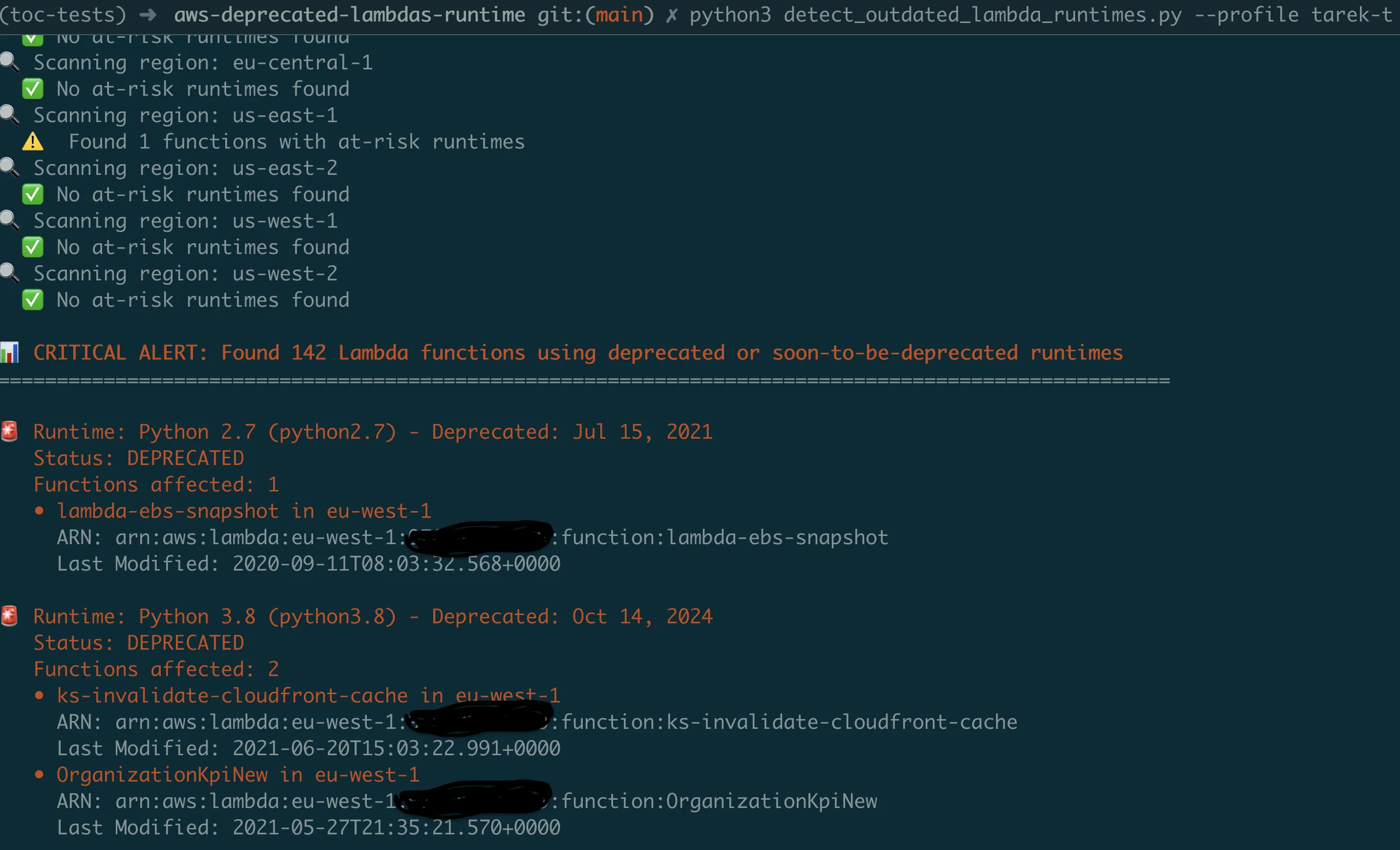
SNS Alert Integration
The CLI now supports optional SNS alerting for immediate notification of critical findings. This enables integration with existing alerting infrastructure and ensures teams are notified when deprecated runtimes are discovered.
# Scan with SNS alerts for critical findings
./detect_outdated_lambda_runtimes_cli.py --all-regions \
  --sns-topic arn:aws:sns:us-east-1:123456789012:lambda-security-alerts

# Production scan with optimized performance and alerting
./detect_outdated_lambda_runtimes_cli.py --profile production \
  --all-regions --max-workers 15 --save-json \
  --sns-topic arn:aws:sns:us-east-1:123456789012:security-alerts
The SNS integration provides intelligent alerting based on severity:
- Critical alerts: Functions using already-deprecated runtimes
- High-risk alerts: Functions with runtimes deprecating within 90 days
- Summary reports: Complete findings with remediation recommendations
The output provides clear, actionable information:
ALERT: Found 23 Lambda functions using deprecated or soon-to-be-deprecated runtimes

Runtime: Python 3.8 (python3.8) - Deprecated: Oct 14, 2024
   Status: DEPRECATED
   Functions affected: 12
   - payment-processor in us-east-1
     Last Modified: 2023-03-15T10:30:00.000Z
   - order-handler in eu-west-1
     Last Modified: 2023-01-20T14:15:00.000Z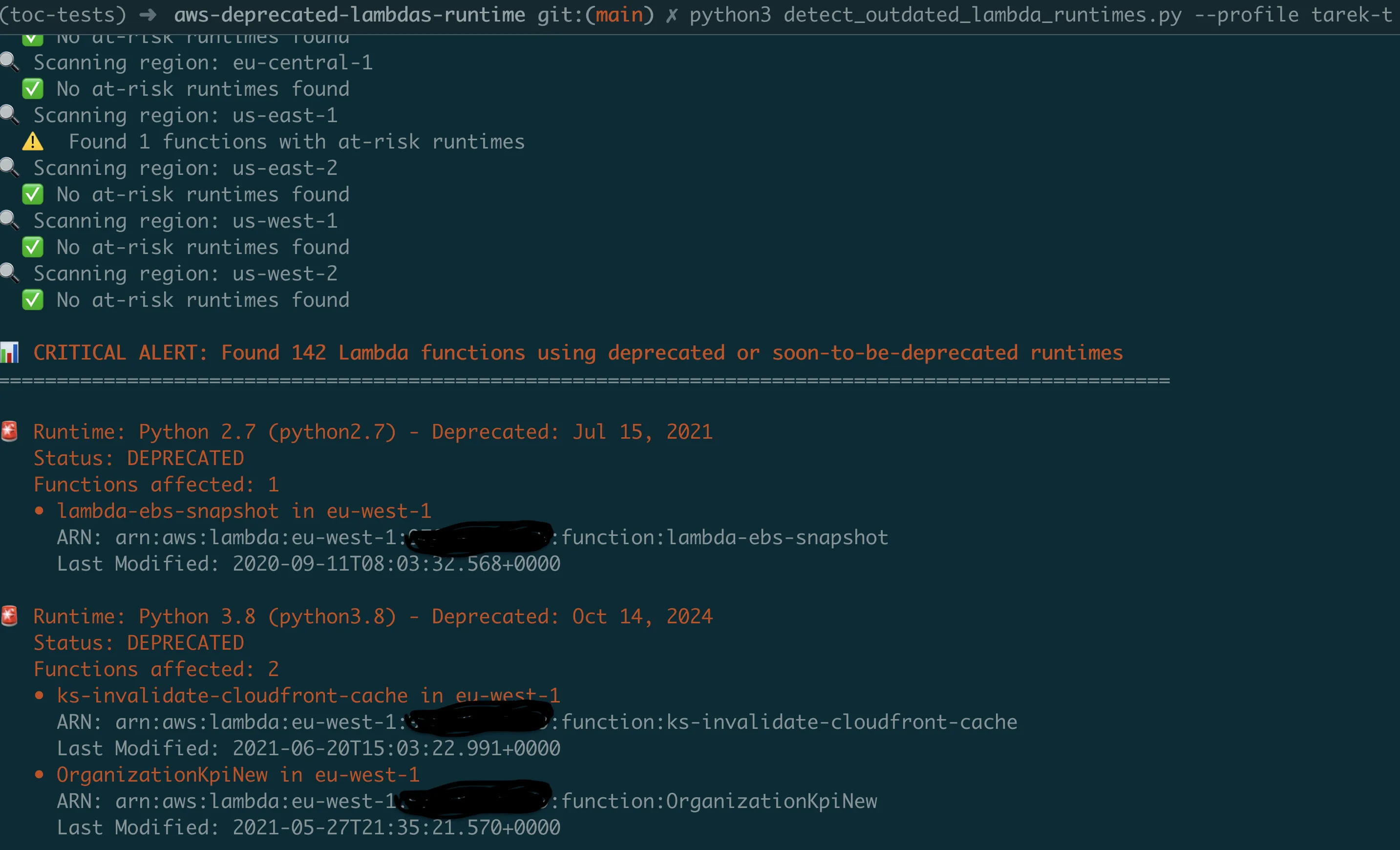
Scaling with Lambda Automation
The CLI tool addresses immediate visibility needs, but continuous monitoring requires automation. The Lambda version provides a serverless implementation that runs on schedule and integrates with existing alerting infrastructure.
Region Scanning Optimization
The Lambda version implements concurrent region scanning to handle enterprise-scale environments efficiently:
def scan_all_regions_parallel(at_risk_runtimes, max_workers=10):
    with ThreadPoolExecutor(max_workers=max_workers) as executor:
        future_to_region = {
            executor.submit(scan_lambda_functions_in_region, region, at_risk_runtimes): region
            for region in get_all_regions()
        }

        for future in as_completed(future_to_region):
            region = future_to_region[future]
            at_risk_functions = future.result()
            all_results.extend(at_risk_functions)
This concurrent approach enables comprehensive scanning across all AWS regions within Lambda's execution time limits.
SNS Integration for Alerting
The Lambda version sends structured alerts through SNS topics:
def send_security_notifications(at_risk_functions, account_id):
    if not at_risk_functions:
        return

    critical_functions = [f for f in at_risk_functions if f['urgency'] == 'CRITICAL']

    message = f"""
    Lambda Runtime Security Alert - Account {account_id}

    Found {len(at_risk_functions)} functions using deprecated runtimes:
    - Critical: {len(critical_functions)} functions
    - High Risk: {len(high_risk_functions)} functions

    Immediate Actions Required:
    1. Review and prioritize function migrations
    2. Update deployment pipelines to prevent new deprecated runtime usage
    3. Test function compatibility with current runtimes
    """

    sns_client.publish(TopicArn=sns_topic_arn, Message=message)
Quick Deployment
# Deploy the automated Lambda version
cd aws-deprecated-lambdas-runtime-lambda
./deploy.sh

# Configured to run daily at 9 AM UTC by default
# Customize schedule in template.yaml
Real Impact and Lessons Learned
Organizations implementing automated runtime tracking typically see:
- Proactive deprecation management: Advance notice enables planned migrations rather than reactive scrambling
- Reduced audit overhead: Automated scanning replaces manual, time-intensive processes
- Improved security posture: Systematic upgrades prevent accumulation of security debt
- Streamlined compliance reporting: Automated documentation supports security reviews
Migration Best Practices
Common patterns that work well for Lambda runtime migrations:
1. Inventory First
Run the scanner before making any changes. You can't manage what you can't measure.
2. Test in Isolation
Create test versions of functions with new runtimes before updating production.
3. Update Infrastructure as Code
Ensure your CloudFormation/Terraform templates use current runtimes:
# Instead of hardcoded versions
Runtime: python3.12

# Use parameters for easier updates
Runtime: !Ref LambdaRuntime
4. Implement CI/CD Gates
Add runtime validation to deployment pipelines. For example, in GitHub Actions:
name: Lambda Runtime Check
on: [push, pull_request]

jobs:
  runtime-validation:
    runs-on: ubuntu-latest
    steps:
      - uses: actions/checkout@v3
      - name: Check SAM template runtimes
        run: |
          # Extract runtime values from SAM template
          RUNTIMES=$(grep -o "Runtime: python[0-9]\+\.[0-9]\+" template.yaml || true)

          # Check for deprecated runtimes
          if echo "$RUNTIMES" | grep -q "python3.8\|python3.7\|python3.6"; then
            echo "ERROR: Deprecated Python runtime detected"
            exit 1
          fi

          echo "All runtimes are current"
5. Document Breaking Changes
Each runtime upgrade may require code changes. Document them for your team.
Troubleshooting Common Issues
AWS Credentials Configuration
The most common issue when running the CLI tool is AWS credentials configuration:
Problem: NoCredentialsError or AccessDenied errors
Solution: Ensure AWS credentials are properly configured:
# Option 1: Configure AWS CLI
aws configure

# Option 2: Use environment variables
export AWS_ACCESS_KEY_ID=your-access-key
export AWS_SECRET_ACCESS_KEY=your-secret-key
export AWS_DEFAULT_REGION=us-east-1

# Option 3: Use specific AWS profile
./detect_outdated_lambda_runtimes_cli.py --profile production
Required IAM Permissions
Ensure your AWS user/role has these minimum permissions:
{
    "Version": "2012-10-17",
    "Statement": [
        {
            "Effect": "Allow",
            "Action": [
                "lambda:ListFunctions",
                "sns:Publish",
                "sts:GetCallerIdentity"
            ],
            "Resource": "*"
        }
    ]
}
Performance and Timeout Issues
Problem: Script (CLI) or Lambda times out or runs slowly
Solutions:
- Increase worker count:
--max-workers 16 - Scan current region only: remove
--all-regions
Problem: SNS publish failures
Solutions:
- Verify SNS topic exists and is accessible
- Check SNS topic permissions for your AWS user/role
- Test without SNS first: remove
--sns-topicargument
Your Next Steps
Start with visibility: Clone the repository and run your first scan today. With parallel processing, it takes less than 30 seconds to get a complete picture of your Lambda runtime landscape across all regions.
git clone https://github.com/TocConsulting/aws-helper-scripts.git
cd aws-helper-scripts/aws-deprecated-lambdas-runtime

# Fast comprehensive scan with parallel processing
./detect_outdated_lambda_runtimes_cli.py --all-regions --save-json
Deploy automation: Set up the Lambda version for continuous monitoring. Configure the lookahead window (6, 12, or 18 months) to detect deprecations well before they occur. Your security team will thank you for the proactive alerts.
Create a migration plan: Use the JSON output to prioritize which functions need immediate attention versus planned upgrades.
Coming Next
In Episode 2, we'll tackle another hidden security risk: IAM users with console access but no MFA enabled. I'll show you how to build an automated scanner that identifies these authentication weak points across your entire AWS organization.
The pattern is the same: what you can't see consistently will eventually hurt you. But with the right tools, staying ahead of security risks becomes systematic rather than reactive.
All tools from this series are production-ready and available at https://github.com/TocConsulting/aws-helper-scripts. Both CLI and Lambda versions include full documentation and deployment guides.
Go Deeper: The State of AWS Security 2026
This article is just the start. Get the full picture with our free whitepaper - 8 chapters covering IAM, S3, VPC, monitoring, agentic AI security, compliance, and a prioritized action plan with 50+ CLI commands.
More Articles
Run AI Locally for AWS Security Work: The Complete Ollama Guide
Stop sending your IAM policies, CloudTrail logs, and infrastructure code to third-party APIs. Run LLMs locally with Ollama on Apple Silicon: private, offline, fast. Complete setup guide with AWS security use cases.
We Detonated the Real LiteLLM Malware on EC2: Here's What Happened
We obtained the actual compromised litellm packages, set up a disposable EC2 instance with honeypot credentials and mitmproxy, and detonated the malware. Full evidence: fork bomb, credential theft in under 2 seconds, IMDS queries, AWS API calls, and C2 exfiltration.
Anatomy of a Supply Chain Attack: How LiteLLM Was Weaponized in 6 Hours
A deep technical breakdown of how threat actor TeamPCP compromised Trivy, pivoted to LiteLLM, and turned a popular AI proxy into a credential-stealing weapon targeting AWS IMDS, Secrets Manager, and Kubernetes.