
Episode 2: The MFA Enforcement Scanner - Automating Your Security Blind Spot
Tarek Cheikh
Founder & AWS Cloud Architect

The Silent Security Risk Hiding in Your AWS Account
Here's a scenario that plays out in organizations daily: your security team implements MFA requirements, trains users, and believes the account is secure. Meanwhile, that contractor account created last month still has console access with just a password. The service account someone converted to human access for "temporary testing" never got MFA enabled. The inherited AWS account from your acquisition has 47 users, and nobody knows which ones actually need console access.
These aren't theoretical risks — they're the exact attack vectors used in real breaches. Attackers specifically target AWS console access because it provides immediate visibility into your entire cloud infrastructure. A single compromised console account can expose databases, storage buckets, and application secrets.
The problem isn't that teams don't care about MFA. It's that manual checking doesn't scale, and gaps appear faster than humans can track them. You need automated scanning that continuously identifies which users have console access without MFA protection.
Why MFA Compliance Matters
Multi-factor authentication reduces account compromise risk by approximately 99.9% according to Microsoft's security research. For AWS environments, this protection is particularly critical because console access provides broad visibility into cloud resources and configurations.
When IAM users have console access without MFA, several risks emerge:
- Credential stuffing attacks: Stolen passwords from other breaches can directly access AWS accounts
- Phishing susceptibility: Users accustomed to single-factor authentication may more easily fall for credential harvesting
- Insider threats: Simplified authentication reduces barriers for malicious internal access
- Compliance violations: Most security frameworks (SOC 2, PCI DSS, NIST) require strong authentication for privileged access
The business impact extends beyond security. Compliance auditors specifically check for MFA enforcement, and gaps often trigger findings that require immediate remediation.
Understanding Current MFA Compliance Approaches
Many organizations rely on basic AWS CLI commands to check user MFA status:
aws iam list-users --query 'Users[].UserName' --output text
aws iam list-mfa-devices --user-name USERNAME
This manual approach has several limitations:
- Time-intensive: Checking individual users requires separate API calls
- No context: Raw MFA device lists don't indicate console access requirements
- No automation: Manual checks don't scale for continuous monitoring
- Limited reporting: Results aren't easily formatted for compliance documentation
Organizations need comprehensive IAM auditing that combines console access detection with MFA status verification across all users simultaneously.
How the MFA Scanner Works
The MFA scanner solves three critical challenges that make manual auditing impractical:
Challenge 1: Identifying Who Actually Needs MFA
Not every IAM user needs MFA. Service accounts and API-only users don't require console access, so MFA isn't relevant for them. The scanner distinguishes between users by checking if they have a "login profile" — AWS's technical term for console access capability.
What this means practically: The tool automatically separates human users (who need MFA) from service accounts (who don't), eliminating false positives that waste security team time.
Challenge 2: Understanding Risk Priority
A user account that logged in yesterday poses different risk than one created six months ago but never used. The scanner tracks both password usage and API access patterns to identify which accounts represent active security risks.
What this means practically: You get a prioritized list focusing on accounts most likely to be compromised — active users without MFA protection get flagged as "Critical" while dormant accounts are marked as "High" risk.
Challenge 3: Scaling Beyond Manual Checks
Manually checking MFA status involves running separate AWS commands for each user — impractical with dozens or hundreds of accounts. The scanner automates this process, checking all users simultaneously and presenting results in actionable formats.
What this means practically: A complete account audit that would take hours manually completes in minutes, with results formatted for both immediate action and compliance documentation.
Getting Started with the CLI Scanner
Prerequisites
Before running the scanner, you'll need:
- AWS CLI configured with credentials that have IAM read permissions
- Python 3.7+ installed on your system
- Required IAM permissions: Your AWS user/role needs ListUsers, GetUser, GetLoginProfile, ListMFADevices, ListAccessKeys, and GetAccessKeyLastUsed permissions
Installation and First Scan
# Get the scanner tool
git clone https://github.com/TocConsulting/aws-helper-scripts.git
cd aws-helper-scripts/check-iam-users-no-mfa

# Install dependencies
pip install -r requirements.txt

# Run your first MFA compliance scan
python check_iam_users_no_mfa_cli.py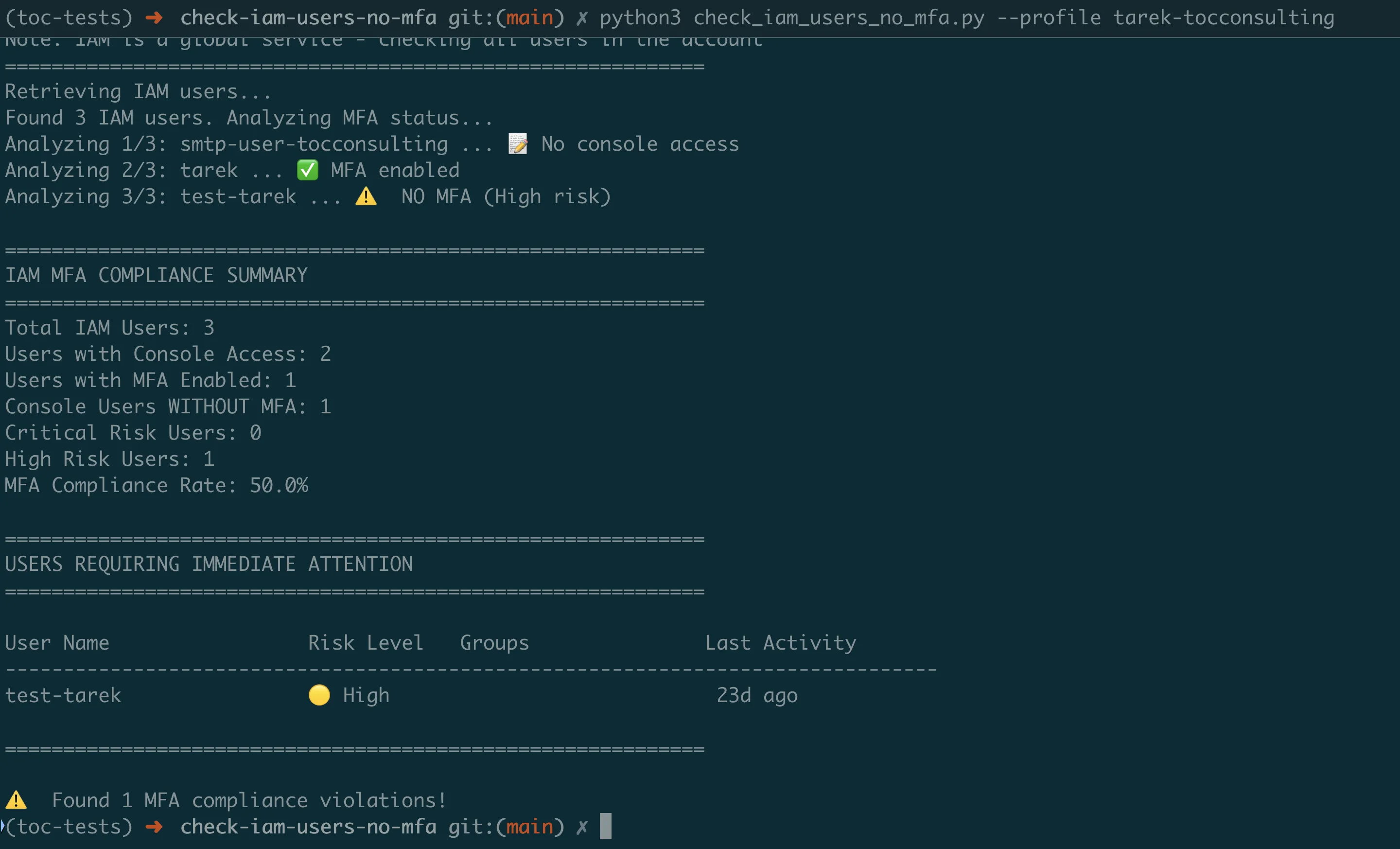
Understanding the Results
The scanner provides an executive summary showing your account's MFA posture:
- Total IAM Users: All user accounts in your AWS account
- Users with Console Access: Accounts that can log into AWS Console (these need MFA)
- Console Users WITHOUT MFA: Your immediate security risk
- MFA Compliance Rate: Percentage of console users with MFA enabled
Below the summary, you'll see specific users requiring attention, prioritized by risk level:
- CRITICAL: Active users (used within 30 days) without MFA
- HIGH: Console-enabled users without MFA (inactive or never used)
- LOW: Users with proper MFA configuration
Practical Usage Examples
For Security Teams: Generate a compliance report for management:
python check_iam_users_no_mfa_cli.py --export-csv quarterly_mfa_audit.csvFor Daily Monitoring: See only violations that need immediate action:
python check_iam_users_no_mfa_cli.py --show-violations-onlyFor Multi-Account Organizations: Scan specific AWS profiles:
python check_iam_users_no_mfa_cli.py --profile production-accountContinuous Monitoring with Lambda Automation
While the CLI scanner is perfect for on-demand audits, production environments need continuous monitoring. The Lambda version runs automatically and sends alerts when new MFA violations appear.
Why Automated Monitoring Matters
The Reality: MFA compliance degrades over time. New users get created without MFA, temporary accounts become permanent, and contractors leave without proper cleanup. Without continuous monitoring, gaps accumulate until the next manual audit.
The Solution: The Lambda version runs weekly (configurable), automatically scanning your entire AWS account and sending alerts only when critical violations are detected.
What Makes a "Critical" Finding
The Lambda scanner uses intelligent risk scoring to reduce alert fatigue:
- Critical Alert: Users who've been active in the last 30 days but don't have MFA enabled
- High Priority: Console users without MFA (regardless of activity)
- Compliance Only: All other findings (documented but don't trigger alerts)
This approach focuses on accounts most likely to be compromised while still maintaining complete audit trails.
Setting Up Automated Monitoring
The Lambda version deploys as a complete AWS infrastructure stack using SAM (Serverless Application Model):
# Navigate to the Lambda version
cd ../check-iam-users-no-mfa-lambda

# Configure your email for security alerts
# Edit template.yaml: change AlertEmail parameter to your security team's email

# Deploy the complete monitoring system
sam build && sam deploy --guided
What Gets Deployed:
- Lambda function with MFA scanning logic
- CloudWatch Events rule for weekly execution (configurable)
- SNS topic configured with your email for alerts
- IAM role with minimal required permissions
Understanding Lambda Alerts
When violations are detected, you'll receive email alerts containing:
- Account Summary: Total users, compliance rate, violation count
- Priority Actions: Specific users requiring immediate attention
- Remediation Guidance: Exact commands to fix common issues
- Compliance Context: Information suitable for audit documentation
The alerts focus on actionable information — you won't get notified about service accounts that don't need console access or users who already have MFA properly configured.
Real-World Implementation Guide
Common Deployment Scenarios
Scenario 1: First-Time Security Assessment
You've inherited an AWS account or are conducting your first security review. Start with the CLI scanner to establish baseline:
- Run initial scan to identify all MFA gaps
- Export CSV report for management review
- Prioritize remediation starting with CRITICAL users
- Deploy Lambda monitoring once initial cleanup is complete
Scenario 2: Ongoing Compliance Monitoring
Your organization needs continuous compliance for SOC 2 or PCI DSS:
- Deploy Lambda scanner for weekly automated checks
- Configure SNS alerts to security team
- Use CLI scanner for quarterly detailed audits
- Archive reports for audit evidence
Scenario 3: Multi-Account Organizations
Managing MFA compliance across multiple AWS accounts:
- Deploy Lambda scanner in each account
- Configure centralized SNS topic for all alerts
- Use CLI scanner with different profiles for consolidated reporting
- Track compliance trends across accounts
Interpreting and Acting on Results
When You See CRITICAL Violations:
- These users logged in recently without MFA protection
- Immediate action required: Enable MFA or disable console access
- Consider these accounts compromised until MFA is enabled
When You See HIGH Violations:
- Console-enabled accounts without MFA (dormant or unused)
- Review if console access is actually needed
- Many of these are service accounts incorrectly configured with console access
Improving Your Compliance Rate:
- Target 100% MFA compliance for console users
- Remove console access from service accounts
- Implement break-glass procedures for emergency access
- Regular user access reviews (quarterly minimum)
Meeting Compliance Requirements
How the Scanner Supports Common Frameworks
SOC 2 Type II Compliance:
- Provides evidence of continuous monitoring (CC6.1)
- Documents logical access controls testing
- Creates audit trail with timestamps and findings
- Demonstrates systematic approach to access management
PCI DSS Requirements:
- Satisfies Requirement 8.3 (MFA for all console access)
- Provides quarterly compliance reports
- Documents remediation activities
- Shows continuous improvement in security posture
ISO 27001 Certification:
- Supports A.9 Access Control requirements
- Provides regular access review documentation
- Demonstrates risk-based approach to security
- Creates measurable security metrics
Using Scanner Output for Audits
When auditors request MFA compliance evidence:
- Provide Historical Trend Data: Show improvement over time using archived CSV reports
- Demonstrate Continuous Monitoring: Share Lambda configuration showing weekly scans
- Document Remediation Process: Include alert emails and resolution timelines
- Show Risk-Based Approach: Explain CRITICAL vs HIGH prioritization
Getting Started Today
Step 1: Assess Your Current Risk (5 minutes)
git clone https://github.com/TocConsulting/aws-helper-scripts.git
cd aws-helper-scripts/check-iam-users-no-mfa
pip install -r requirements.txt
python check_iam_users_no_mfa_cli.py --export-csv initial_assessment.csv
This immediate assessment will show you:
- How many users lack MFA protection
- Which accounts pose the highest risk
- Your current compliance percentage
Step 2: Fix Critical Issues (30 minutes)
Based on your scan results:
- For CRITICAL users: Contact them immediately to enable MFA
- For service accounts with console access: Remove console access using:
aws iam delete-login-profile --user-name SERVICE-ACCOUNT-NAME3. For inactive users: Consider disabling or removing accounts
Step 3: Deploy Continuous Monitoring (15 minutes)
cd ../check-iam-users-no-mfa-lambda
sam build && sam deploy --guided
Answer the deployment prompts:
- Stack name:
mfa-compliance-scanner - AWS Region: Your preferred region
- AlertEmail: Your security team's email
- Confirm changes and deploy
Step 4: Establish Ongoing Process
- Weekly: Lambda automatically scans and alerts on violations
- Monthly: Review trends and address new violations
- Quarterly: Generate compliance reports for management
- Annually: Review and update MFA policies and procedures
Key Takeaways
What You've Learned
- MFA gaps are inevitable — They appear through normal operations, not negligence
- Manual checking doesn't scale — Automation is essential for consistent compliance
- Risk-based prioritization works — Focus on active users first, then clean up the rest
- Continuous monitoring prevents drift — Weekly scans catch issues before they become incidents
Common Pitfalls to Avoid
- Don't ignore "never used" accounts — These are often service accounts with unnecessary console access
- Don't rely on quarterly audits — MFA gaps can appear and be exploited within days
- Don't alert on everything — Focus alerts on critical findings to avoid alert fatigue
- Don't forget about inherited accounts — Acquisitions and migrations often bring security debt
Success Metrics
Track these metrics to demonstrate security improvement:
- MFA Compliance Rate: Should trend toward 100% for console users
- Mean Time to Remediation: How quickly you address new violations
- False Positive Rate: Service accounts incorrectly flagged (should decrease over time)
- Coverage: Percentage of AWS accounts with monitoring deployed
Coming Next
In Episode 3, we'll tackle another critical blind spot: publicly accessible RDS databases. You'll learn how to build scanners that identify exposed databases, check encryption settings, and validate network configurations — before attackers find them first.
All tools from this series are production-ready and available at https://github.com/TocConsulting/aws-helper-scripts. Both CLI and Lambda versions include full documentation and deployment guides.
Go Deeper: The State of AWS Security 2026
This article is just the start. Get the full picture with our free whitepaper - 8 chapters covering IAM, S3, VPC, monitoring, agentic AI security, compliance, and a prioritized action plan with 50+ CLI commands.
More Articles
Run AI Locally for AWS Security Work: The Complete Ollama Guide
Stop sending your IAM policies, CloudTrail logs, and infrastructure code to third-party APIs. Run LLMs locally with Ollama on Apple Silicon: private, offline, fast. Complete setup guide with AWS security use cases.
We Detonated the Real LiteLLM Malware on EC2: Here's What Happened
We obtained the actual compromised litellm packages, set up a disposable EC2 instance with honeypot credentials and mitmproxy, and detonated the malware. Full evidence: fork bomb, credential theft in under 2 seconds, IMDS queries, AWS API calls, and C2 exfiltration.
Anatomy of a Supply Chain Attack: How LiteLLM Was Weaponized in 6 Hours
A deep technical breakdown of how threat actor TeamPCP compromised Trivy, pivoted to LiteLLM, and turned a popular AI proxy into a credential-stealing weapon targeting AWS IMDS, Secrets Manager, and Kubernetes.