
Episode 3: Public RDS Detective - Finding Your Exposed Databases Before Attackers Do
Tarek Cheikh
Founder & AWS Cloud Architect

The $4.88 Million Question: Is Your Database Exposed?
Right now, as you read this, there are automated bots scanning the internet for exposed databases. They're looking for RDS instances with weak configurations — and when they find them, the average cost to organizations is $4.88 million per breach (IBM Cost of Data Breach Report 2024).
Here's the terrifying part: most exposed databases aren't intentionally public. They become exposed through a dangerous combination of factors:
- A developer temporarily makes a database public for testing and forgets to revert it
- Someone copies a production database for staging but leaves the security groups wide open
- A migration script creates databases with default settings that include public accessibility
- Teams assume "PubliclyAccessible = false" means secure, missing that security groups control actual access
The challenge isn't just finding public databases — it's understanding which ones are actually exposed to the internet versus those that are public but properly secured. This distinction is critical and often missed by basic security tools.
Why Traditional Database Security Checks Fail
The "Checkbox" Problem
Most organizations check database security like this:
- Is the database private? (Check the PubliclyAccessible flag)
- Is it encrypted? (Check the StorageEncrypted setting)
- Does it have backups? (Check the backup retention period)
This approach misses the real security picture. A database marked as "private" can still be exposed if it's in a public subnet with poor routing. A "public" database might be perfectly secure if its security groups only allow specific application servers to connect.
The Real Security Questions You Should Ask
- Can anyone on the internet actually connect to this database? (Not just "is it public?")
- If someone gains access, is the data encrypted? (Impact mitigation)
- Which databases handle sensitive data? (Risk prioritization)
- How quickly would we know if a database was compromised? (Detection capability)
The RDS Detective tool answers these questions automatically, continuously, and at scale.
Understanding How Database Exposure Actually Happens
Scenario 1: The Development Database Disaster
Your team spins up a test database for a new feature. To simplify testing, they:
- Set PubliclyAccessible = true (to connect from their laptop)
- Open port 5432 to 0.0.0.0/0 (to avoid VPN issues)
- Use a simple password (it's just for testing, right?)
Two months later, this "temporary" database contains a copy of production data for "realistic testing." It's now a ticking time bomb.
Scenario 2: The Migration Mistake
During a cloud migration, databases are recreated with scripts. The scripts work perfectly, except:
- They use default VPC settings (which might be public)
- Security groups are copied but not validated
- Encryption is disabled to speed up the migration
Post-migration validation checks if databases exist and respond — not if they're secure.
Scenario 3: The Inheritance Problem
Your company acquires another organization. You inherit their AWS accounts containing:
- Databases you don't know exist
- Security configurations from a different security philosophy
- No documentation about what's intentionally public versus accidentally exposed
Without automated scanning, these unknown databases remain exposed indefinitely.
How the RDS Detective Works
The RDS Detective solves these problems by performing multi-dimensional security analysis that goes beyond simple configuration checks.
Step 1: Discovery Across All Regions
The tool first discovers every RDS instance across all AWS regions. Many breaches occur in "forgotten" regions where development or testing happened months ago.
What this finds: Databases in regions like ap-south-1 or sa-east-1 that your team forgot existed.
Step 2: Actual Exposure Analysis
Instead of just checking the PubliclyAccessible flag, the tool analyzes:
- Is the database in a public or private subnet?
- What do the security groups actually allow?
- Are there any 0.0.0.0/0 rules that expose the database to the internet?
What this reveals: The difference between "configured as public" and "actually exposed to the internet."
Step 3: Risk-Based Classification
The tool assigns risk levels based on multiple factors:
- CRITICAL: Public + Internet accessible (0.0.0.0/0) + Contains data
- HIGH: Public + Overly permissive access (large CIDR blocks)
- MEDIUM: Public but properly restricted OR Private but unencrypted
- LOW: Private + Encrypted + Properly configured
Why this matters: You can focus on the databases that actually pose risk, not waste time on false positives.
Step 4: Automated Remediation Commands
For each issue found, the tool generates exact AWS CLI commands to fix the problem. No guessing, no manual lookup — just copy, paste, and execute.
Getting Started with the RDS Detective
Prerequisites
Before running the scanner, ensure you have:
- AWS CLI configured with credentials
- Python 3.7+ installed
- Required IAM permissions:
- RDS: DescribeDBInstances, DescribeDBClusters
- EC2: DescribeSecurityGroups, DescribeSubnets
- For remediation: ModifyDBInstance, RevokeSecurityGroupIngress
Installation and First Scan
# Get the RDS Detective tool
git clone https://github.com/TocConsulting/aws-helper-scripts.git
cd aws-helper-scripts/check-public-rds

# Install dependencies
pip install -r requirements.txt

# Run comprehensive security scan across all regions
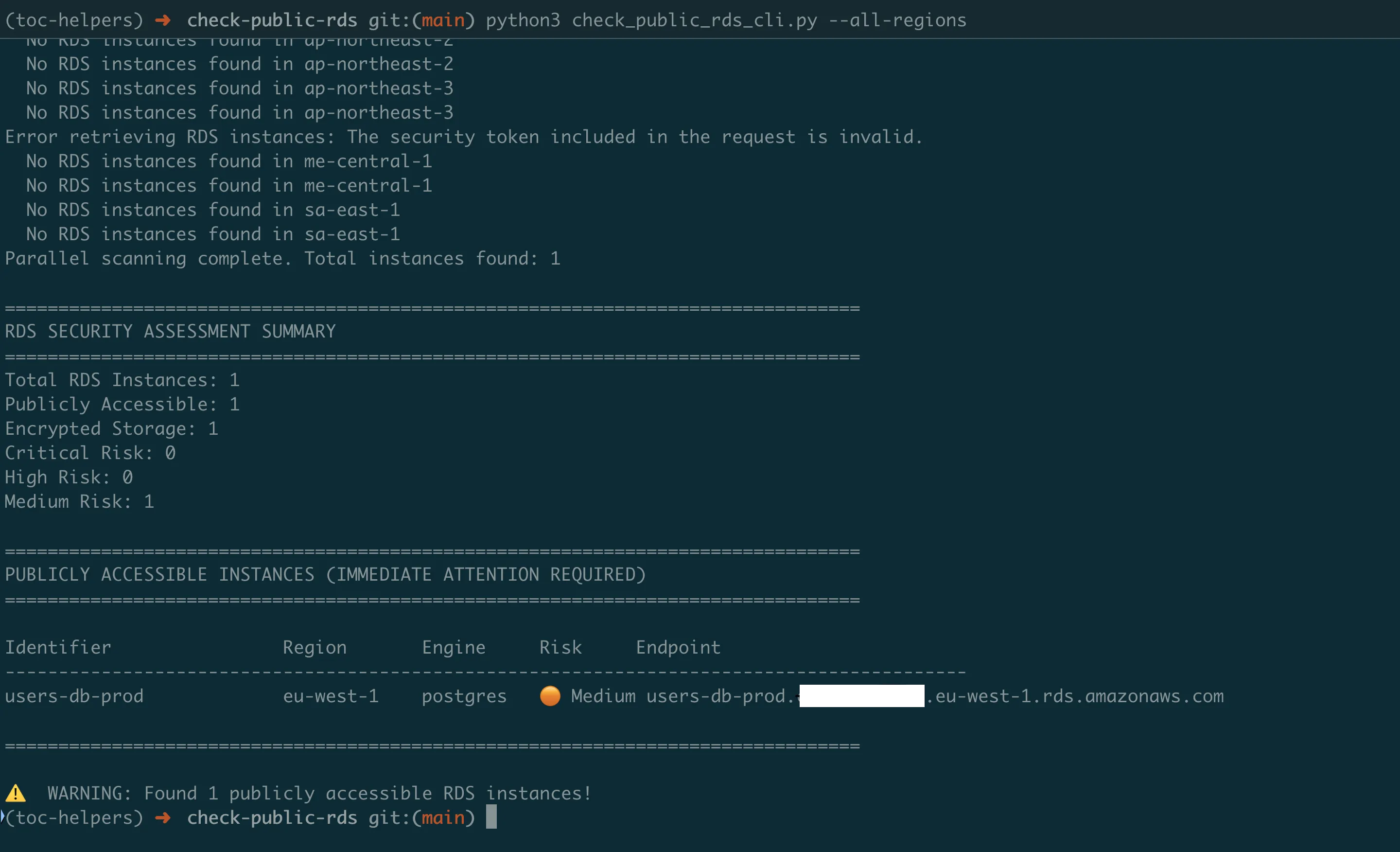
python check_public_rds_cli.py --all-regions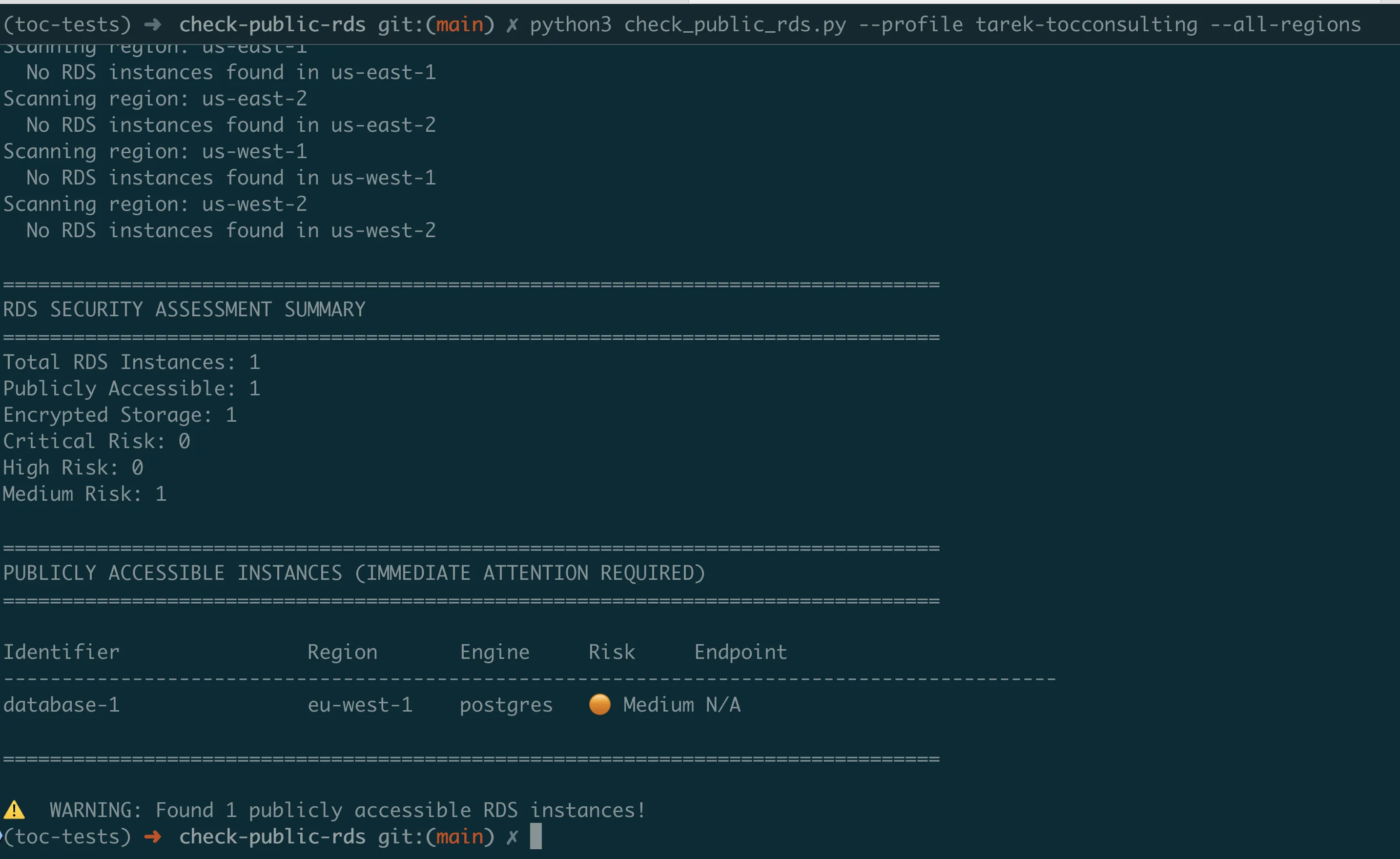
Understanding the Output
The scanner provides a clear security assessment:
================================================================================
RDS SECURITY ASSESSMENT SUMMARY
================================================================================
Total RDS Instances: 5
Publicly Accessible: 2
Encrypted Storage: 3
Critical Risk: 1
High Risk: 1
Medium Risk: 2

================================================================================
PUBLICLY ACCESSIBLE INSTANCES (IMMEDIATE ATTENTION REQUIRED)
================================================================================

Identifier               Region       Engine     Risk     Endpoint
------------------------------------------------------------------------------------------
prod-mysql-db           us-east-1    mysql      Critical mydb.cluster-xyz.us-east-1.rds.amazonaws.com
  -- Open to Internet (0.0.0.0/0) - tcp 3306
  Remediation commands:
    1. Make RDS instance private
    2. Remove open access from security group

staging-postgres        us-west-1    postgres   High   staging.xyz.us-west-1.rds.amazonaws.com
  -- Large network access (10.0.0.0/16) - tcp 5432
  Remediation commands:
    1. Make RDS instance private

================================================================================
UNENCRYPTED INSTANCES
================================================================================
  legacy-mysql-db (us-east-1) - mysql
  test-db (us-west-2) - postgres
The tool uses visual indicators to help you quickly identify issues:
- Critical: Immediate action required
- High: Address soon
- Medium: Review and improve
- Low: Properly secured
Practical Usage Scenarios
For Security Teams — Immediate Risk Assessment:
# Find all internet-exposed databases NOW
python check_public_rds_cli.py --all-regions --public-only

# Generate remediation script
python check_public_rds_cli.py --all-regions --export-remediation fix_databases.sh

# Execute fixes
bash fix_databases.sh
For Compliance Audits — Documentation:
# Generate comprehensive security report
python check_public_rds_cli.py --all-regions --export-csv rds_audit_Q4_2024.csv

# Create JSON for SIEM integration
python check_public_rds_cli.py --all-regions --export-json rds_security.json
For DevOps — Pre-deployment Validation:
# Check specific region after deployment
python check_public_rds_cli.py --region us-east-1 --public-only
Continuous Monitoring with Lambda Automation
While manual scans catch current issues, databases can become exposed at any time. The Lambda version provides 24/7 automated monitoring.
Why Automated Monitoring is Critical
The Reality: Database configurations change constantly:
- Developers modify security groups for debugging
- Infrastructure updates can alter network configurations
- New databases are created daily
- Security group rules accumulate over time
The Solution: The Lambda version runs automatically (daily/weekly), scanning all databases and alerting only on critical issues.
Setting Up Automated Monitoring
# Navigate to Lambda version
cd ../check-public-rds-lambda

# Configure your settings
# Edit template.yaml:
#   - AlertEmail: security-team@company.com
#   - ScanSchedule: rate(1 day)  # or cron(0 9 ? * MON *)

# Deploy the monitoring system
sam build && sam deploy --guided
What Gets Deployed:
- Lambda function that scans all RDS instances
- CloudWatch Events rule for automated execution
- SNS topic for security alerts
- IAM role with read-only RDS/EC2 permissions
- CloudWatch Logs for audit trail
Alert Intelligence
The Lambda version sends targeted alerts to avoid alert fatigue:
Critical Alert (Immediate Action Required):
Subject: CRITICAL: Internet-Exposed Database Detected

prod-customer-db is exposed to the internet!
Region: us-east-1
Risk: Port 5432 accessible from 0.0.0.0/0
Data Classification: Customer PII

IMMEDIATE ACTIONS:
1. Execute these commands NOW:
   aws rds modify-db-instance \
     --db-instance-identifier prod-customer-db \
     --no-publicly-accessible \
     --region us-east-1

2. Review access logs for unauthorized connections
3. Rotate database credentials
4. Notify security team lead
Weekly Summary (Trending and Compliance):
Subject: Weekly RDS Security Report

Summary:
- Total Databases: 47
- New This Week: 3
- Fixed This Week: 2
- Compliance Rate: 95.7% (up from 93.2%)

Action Items:
- 2 databases still need remediation
- 5 databases missing encryption
- Review attached detailed report
Real-World Implementation Guide
Phase 1: Initial Assessment (Day 1)
Morning — Discovery:
- Run scanner across all regions
- Export comprehensive report
- Identify CRITICAL and HIGH risks
Afternoon — Immediate Remediation:
- Fix all CRITICAL issues (internet-exposed databases)
- Document changes for change management
- Notify database owners
Phase 2: Systematic Cleanup (Week 1)
Day 2–3:
- Address HIGH risk databases
- Enable encryption where missing
- Review and tighten security groups
Day 4–5:
- Deploy Lambda monitoring
- Configure alerting thresholds
- Test alert delivery
Phase 3: Continuous Improvement (Ongoing)
Weekly:
- Review Lambda alerts
- Update security group baselines
- Track compliance metrics
Monthly:
- Analyze trends from reports
- Update remediation playbooks
- Security team review meeting
Quarterly:
- Comprehensive audit with CLI tool
- Compare against baseline
- Report to management
Understanding and Using Remediation Commands
The RDS Detective doesn't just find problems — it tells you exactly how to fix them.
Example: Fixing an Exposed Database
When the scanner finds an exposed database, it provides:
# CRITICAL: prod-customer-db exposed to internet
# Generated remediation commands:

# Step 1: Remove internet access immediately
aws ec2 revoke-security-group-ingress \
  --group-id sg-0123456789abcdef \
  --protocol tcp \
  --port 5432 \
  --cidr 0.0.0.0/0 \
  --region us-east-1

# Step 2: Make database private
aws rds modify-db-instance \
  --db-instance-identifier prod-customer-db \
  --no-publicly-accessible \
  --apply-immediately \
  --region us-east-1

# Step 3: Add specific application access
aws ec2 authorize-security-group-ingress \
  --group-id sg-0123456789abcdef \
  --source-group sg-app-servers \
  --protocol tcp \
  --port 5432 \
  --region us-east-1
Why These Commands Matter
- Revoke commands remove dangerous access immediately
- Modify commands change database configuration
- Authorize commands add proper restricted access
The order matters — remove risk first, then add proper access.
Understanding What the Scanner Finds
The RDS Detective identifies real security issues based on actual configurations:
Public Databases with Internet Access (Critical)
- Database marked as PubliclyAccessible=true
- Security groups allow 0.0.0.0/0 access
- Direct exposure to internet attacks
Public Databases with Restricted Access (High)
- Database marked as PubliclyAccessible=true
- Security groups allow large network ranges (like 10.0.0.0/16)
- Overly permissive but not fully exposed
Unencrypted Storage (Medium)
- Database storage not encrypted
- Data readable if infrastructure is compromised
- Required for compliance frameworks
Success Metrics and ROI
Track these metrics to demonstrate the value of automated database security:
Security Metrics
- Exposure Time: Average time databases remain exposed (should decrease)
- Mean Time to Remediation: How quickly issues are fixed after detection
- False Positive Rate: Percentage of alerts that don't require action
- Coverage: Percentage of databases monitored
Business Metrics
- Compliance Rate: Percentage meeting security standards
- Audit Findings: Reduction in database-related audit issues
- Incident Prevention: Estimated breaches prevented (based on exposure x threat level)
- Time Saved: Hours of manual checking eliminated
Typical Results After Implementation
Week 1:
- Identify 10–20% of databases with security issues
- Fix all critical exposures
- Establish baseline metrics
Month 1:
- Achieve 95%+ compliance rate
- Reduce manual audit time by 90%
- Prevent average 2–3 potential incidents
Quarter 1:
- Demonstrate continuous compliance
- Show improvement trend to auditors
- Justify security investment with metrics
Key Takeaways
What You've Learned
- "Public" doesn't always mean "exposed" — Security groups determine actual accessibility
- Multi-dimensional analysis is essential — Single checks miss critical vulnerabilities
- Automated monitoring prevents drift — Configurations change; continuous scanning is mandatory
- Remediation must be immediate and specific — Generic fixes don't work; you need exact commands
Common Pitfalls to Avoid
- Don't ignore "test" databases — They often contain production data copies
- Don't trust the PubliclyAccessible flag alone — It's just one part of the security picture
- Don't delay remediation — Every hour an exposed database remains public increases risk
- Don't forget about snapshots — Exposed database snapshots are equally dangerous
Best Practices for Database Security
- Default to private — Databases should never be public unless absolutely necessary
- Encrypt everything — Storage encryption should be mandatory, not optional
- Use database proxies — Consider RDS Proxy or bastion hosts instead of direct access
- Regular audits — Weekly automated scans, monthly reviews, quarterly deep-dives
- Document exceptions — If a database must be public, document why and add compensating controls
Next Steps
Immediate Actions (Today)
- Run the RDS Detective to find current exposures
- Fix all CRITICAL issues immediately
- Document findings for security records
This Week
- Deploy Lambda monitoring
- Configure your alert email
- Run first automated scan
- Create remediation playbook
This Month
- Achieve 100% remediation of HIGH/CRITICAL issues
- Enable encryption on all databases
- Implement security group standards
- Train team on tool usage
Coming Next
In Episode 4, we'll tackle another massive security risk: exposed S3 buckets. You'll learn how to build scanners that find publicly accessible buckets, analyze their policies, and prevent the data leaks that make headlines. We'll go beyond simple ACL checks to understand object-level permissions, bucket policies, and cross-account access.
All tools from this series are production-ready and available at https://github.com/TocConsulting/aws-helper-scripts. Both CLI and Lambda versions are thoroughly tested and include comprehensive documentation.
Go Deeper: The State of AWS Security 2026
This article is just the start. Get the full picture with our free whitepaper - 8 chapters covering IAM, S3, VPC, monitoring, agentic AI security, compliance, and a prioritized action plan with 50+ CLI commands.
More Articles
Run AI Locally for AWS Security Work: The Complete Ollama Guide
Stop sending your IAM policies, CloudTrail logs, and infrastructure code to third-party APIs. Run LLMs locally with Ollama on Apple Silicon: private, offline, fast. Complete setup guide with AWS security use cases.
We Detonated the Real LiteLLM Malware on EC2: Here's What Happened
We obtained the actual compromised litellm packages, set up a disposable EC2 instance with honeypot credentials and mitmproxy, and detonated the malware. Full evidence: fork bomb, credential theft in under 2 seconds, IMDS queries, AWS API calls, and C2 exfiltration.
Anatomy of a Supply Chain Attack: How LiteLLM Was Weaponized in 6 Hours
A deep technical breakdown of how threat actor TeamPCP compromised Trivy, pivoted to LiteLLM, and turned a popular AI proxy into a credential-stealing weapon targeting AWS IMDS, Secrets Manager, and Kubernetes.