
Building an EC2 Security Scanner: 46 Checks, 137 Controls, Zero Excuses
Tarek Cheikh
Founder & AWS Cloud Architect
Part 2 of 3 in the EC2 Security Series
Your security team wants a compliance report. Your next audit is in two weeks. You have 47 EC2 instances and no idea which ones are actually locked down.
In Part 1, I showed you everything that can go wrong with EC2 security. Public instances, open ports, IMDSv1, secrets in UserData, public snapshots, the list goes on.
Now let me show you how to find all of it. One command.
The Problem With Manual Checks
You could write a script. I've done it. Everyone has.
# Check IMDSv2...
aws ec2 describe-instances --query "..." --output json

# Check security groups...
aws ec2 describe-security-groups --filters "..." --output json

# Check EBS encryption...
aws ec2 describe-volumes --query "..." --output json
Repeat 46 times. Parse the JSON. Handle pagination. Deal with rate limits. Cover all edge cases. Then format a report for your security team. Then map everything to compliance frameworks. Then do it again next month.
That's not a script. That's a full-time job.
One Command
pip install ec2-security-scannerThen:
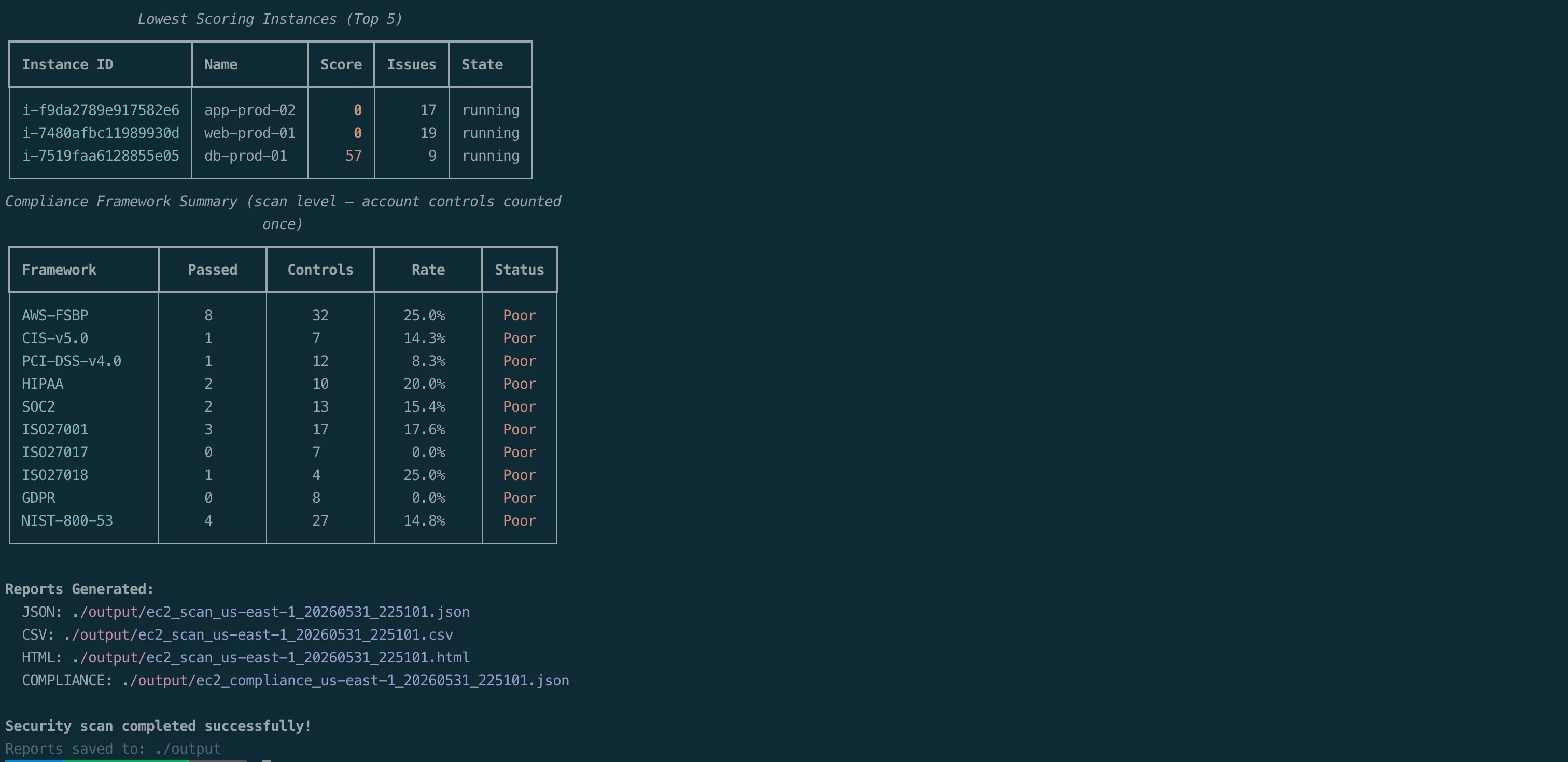
ec2-security-scanner securityThat's it. 46 security checks. 8 categories. 10 compliance frameworks. 137 controls. Every running EC2 instance in your account. Scored from 0 to 100.
What It Checks
Category A: Instance Security (8 checks)
| ID | Check | What It Catches |
|---|---|---|
| A.1 | IMDSv2 enforcement | Instances still using IMDSv1 (the Capital One attack vector) |
| A.2 | Launch template IMDSv2 | Templates that will create insecure instances |
| A.3 | Public IP | Instances directly exposed to the internet |
| A.4 | IAM instance profile | Instances with no IAM role (can't use AWS services securely) |
| A.5 | Virtualization type | Paravirtual instances (legacy, less secure than HVM) |
| A.6 | Multiple ENIs | Dual-homed instances spanning network boundaries |
| A.7 | Detailed monitoring | CloudWatch basic vs. detailed monitoring |
| A.8 | UserData secrets | AWS keys, passwords, API tokens hardcoded in launch scripts |
A.8 scans for 24 secret patterns including AWS access keys, database passwords, GitHub tokens, Slack tokens, private keys, and more. It decodes the base64 UserData and runs regex matching against every line.
Category B: Network Security (11 checks)
| ID | Check | What It Catches |
|---|---|---|
| B.1 | Default security group | VPC default SG with rules (should be empty) |
| B.2 | SSH open to world | Port 22 accessible from 0.0.0.0/0 or ::/0 |
| B.3 | RDP open to world | Port 3389 accessible from 0.0.0.0/0 or ::/0 |
| B.4 | High-risk ports | 24 dangerous ports open to the internet |
| B.5 | Remote admin ports | SSH, RDP, WinRM (5985/5986) open to world |
| B.6 | VPC flow logs | No flow logs enabled on the VPC |
| B.7 | NACL admin ports | Network ACLs allowing 0.0.0.0/0 to ports 22/3389 |
| B.8 | Source/dest check | Source/destination check disabled on ENIs |
| B.9 | Unrestricted egress | Security groups allowing all outbound traffic |
| B.10 | Unauthorized ports | Only ports 80/443 should be open to the world |
| B.11 | VPN IKEv2 | Site-to-Site VPN tunnels permitting the weaker IKEv1 (FSBP EC2.183) |
The 24 high-risk ports (B.4): 20, 21, 22, 23, 25, 110, 135, 143, 445, 1433, 1434, 3000, 3306, 3389, 4333, 5000, 5432, 5500, 5601, 8080, 8088, 8888, 9200, 9300.
Category C: Storage Security (7 checks)
| ID | Check | What It Catches |
|---|---|---|
| C.1 | EBS volume encryption | Unencrypted attached volumes |
| C.2 | EBS default encryption | Account-level EBS encryption not enabled |
| C.3 | Public EBS snapshots | Snapshots restorable by anyone |
| C.4 | EBS backup coverage | Volumes not covered by AWS Backup |
| C.5 | Launch template EBS encryption | Templates creating unencrypted volumes |
| C.6 | Public AMIs | Account-owned AMIs shared publicly |
| C.7 | EBS snapshot block public access | Account-level snapshot public-access not blocked (FSBP EC2.182) |
Category D: Access Control (4 checks)
| ID | Check | What It Catches |
|---|---|---|
| D.1 | IAM role permissions | AdministratorAccess, PowerUserAccess, or *:* wildcards |
| D.2 | Key pair usage | SSH key pairs without SSM management |
| D.3 | Serial console | EC2 serial console access enabled at account level |
| D.4 | Instance Connect | No EC2 Instance Connect endpoints in the VPC |
Category E: Logging & Monitoring (4 checks)
| ID | Check | What It Catches |
|---|---|---|
| E.1 | CloudTrail | No active trail with logging enabled |
| E.2 | CloudWatch alarms | No alarms configured for the instance |
| E.3 | SSM managed | Instance not in Systems Manager inventory |
| E.4 | GuardDuty | GuardDuty disabled, missing runtime or EBS malware protection |
Category F: Patch & Vulnerability (3 checks)
| ID | Check | What It Catches |
|---|---|---|
| F.1 | SSM patch compliance | Missing or failed patches |
| F.2 | AMI age | AMIs older than 180 days |
| F.3 | Inspector v2 | EC2 scanning disabled or critical/high findings present |
Category G: Network Exposure (5 checks)
| ID | Check | What It Catches |
|---|---|---|
| G.1 | Unused Elastic IPs | EIPs with no association (cost waste + potential attack surface) |
| G.2 | Launch template public IP | Templates assigning public IPs to instances |
| G.3 | Subnet auto-assign public IP | Subnets that auto-assign public IPs |
| G.4 | VPC Block Public Access | BPA not blocking internet gateway traffic |
| G.5 | Transit Gateway auto-accept | Transit Gateway auto-accepting VPC attachments |
Category H: Tagging & Inventory (3 checks)
| ID | Check | What It Catches |
|---|---|---|
| H.1 | Required tags | Missing Name, Environment, or Owner tags |
| H.2 | Stopped instances | Instances stopped for more than 30 days |
| H.3 | Unused security groups | SGs not attached to any network interface |
Plus a region-level launch template audit: because describe-instances does not tell you which launch template an instance came from, the scanner inspects every launch template in the region directly for IMDSv2 enforcement, public IP assignment, and EBS encryption. That is the 46th check, reported once per region rather than per instance.
How Scoring Works
The scanner produces two independent scores, because not every problem belongs to a single instance.
- An instance score (0 to 100) for what each instance controls: its metadata options, its security groups, its volumes, its IAM role, its UserData.
- An environment score (0 to 100) for account and VPC wide posture: GuardDuty, CloudTrail, VPC Block Public Access, the default security group, flow logs, public AMIs, and so on.
Account and VPC findings are counted once per scan, not once per instance. If GuardDuty is off, that is one regional problem, not a penalty multiplied across fifty instances. This keeps the per-instance average honest and means a framework's compliance percentage does not change with fleet size.
Instance score
Every instance starts at 100. Deductions by severity:
CRITICAL
- Secrets in UserData: -25
- Public EBS snapshots of the instance's volumes: -20
Security group exposure (non-stacking, highest single penalty only):
- High-risk ports open to the world (data store ports like 3306, 5432, ...etc): -20
- SSH open to the world: -15
- RDP open to the world: -15
- Remote admin ports open: -15
- Unauthorized ports open (anything other than 80/443): -10
If an instance has both SSH and a high-risk port open, it loses 20 points, not 35. All overlapping “ports open to 0.0.0.0/0” penalties collapse to the single highest one.
HIGH
- IMDSv2 not enforced: -15
- Public IP assigned: -15
- IAM admin/wildcard access: -15
- Inspector v2 disabled or critical/high findings: -8
MEDIUM (-5 to -10): unencrypted EBS volumes, SSM patch non-compliance, no IAM instance profile, source/dest check disabled, not SSM managed, subnet auto-assign public IP, no CloudWatch alarms, stale AMI, no detailed monitoring, paravirtual instance, key pair without SSM.
LOW (-2 to -3): multiple ENIs, no backup plan, unrestricted egress, missing tags, long-stopped instance, IMDSv2 hop limit above 2.
Environment score
Account and VPC posture starts at 100 and is scored once per scan:
- Public AMIs: -20
- Default security group has rules: -10
- EBS snapshot block public access off: -10
- Transit Gateway auto-accept: -10
- GuardDuty disabled: -10
- VPC Block Public Access not blocking: -10
- CloudTrail disabled: -10
- VPN tunnels permitting IKEv1: -10
- No VPC flow logs: -10
- Launch templates without IMDSv2, assigning public IPs, or with unencrypted EBS: -10 / -10 / -5
- EBS default encryption disabled, serial console enabled, NACL admin ports open: -5 each
- Unused security groups: -2, unused Elastic IPs: -2, no Instance Connect endpoint: -1
Both scores are max(0, 100 - total_deductions).
| Score | Rating | What It Means |
|---|---|---|
| 90-100 | Excellent | Keep doing what you're doing |
| 70-89 | Good | Minor gaps to address |
| 50-69 | Needs Improvement | Medium-priority fixes needed |
| 0-49 | Critical | Stop everything and fix this now |
Architecture
Here's why it's fast and why it won't hammer your AWS API limits. The scanner uses a three-tier architecture to minimize API calls:
Tier 1: Account-level (run once): EBS default encryption, serial console, GuardDuty, CloudTrail, public AMIs, unused EIPs, Transit Gateway, VPC Block Public Access. These results are shared across all instances.
Tier 2: VPC-level (run once per VPC): Default security group, VPC flow logs, NACL rules, Instance Connect endpoints. Results are keyed by VPC ID.
Tier 3: Instance-level (parallel): Everything else. Each instance is scanned in its own thread using ThreadPoolExecutor. Thread safety is handled via threading.local(), each thread gets its own boto3 session.
Security group rules are fetched once per instance and reused across 6 checks (B.2 to B.5, B.9, B.10). No redundant API calls.
Compliance Mapping
Every check maps to controls across 10 compliance frameworks:
| Framework | Controls |
|---|---|
| AWS Foundational Security Best Practices | 32 |
| NIST SP 800-53 Rev5 | 27 |
| ISO 27001:2022 | 17 |
| SOC 2 Trust Service Criteria | 13 |
| PCI DSS v4.0.1 | 12 |
| HIPAA Security Rule | 10 |
| GDPR (EU) 2016/679 | 8 |
| CIS AWS Foundations v5.0 | 7 |
| ISO 27017 (Cloud-Specific) | 7 |
| ISO 27018 (PII in Cloud) | 4 |
| Total | 137 |
The compliance report shows pass/fail for every control, per instance. Hand it to your auditor.
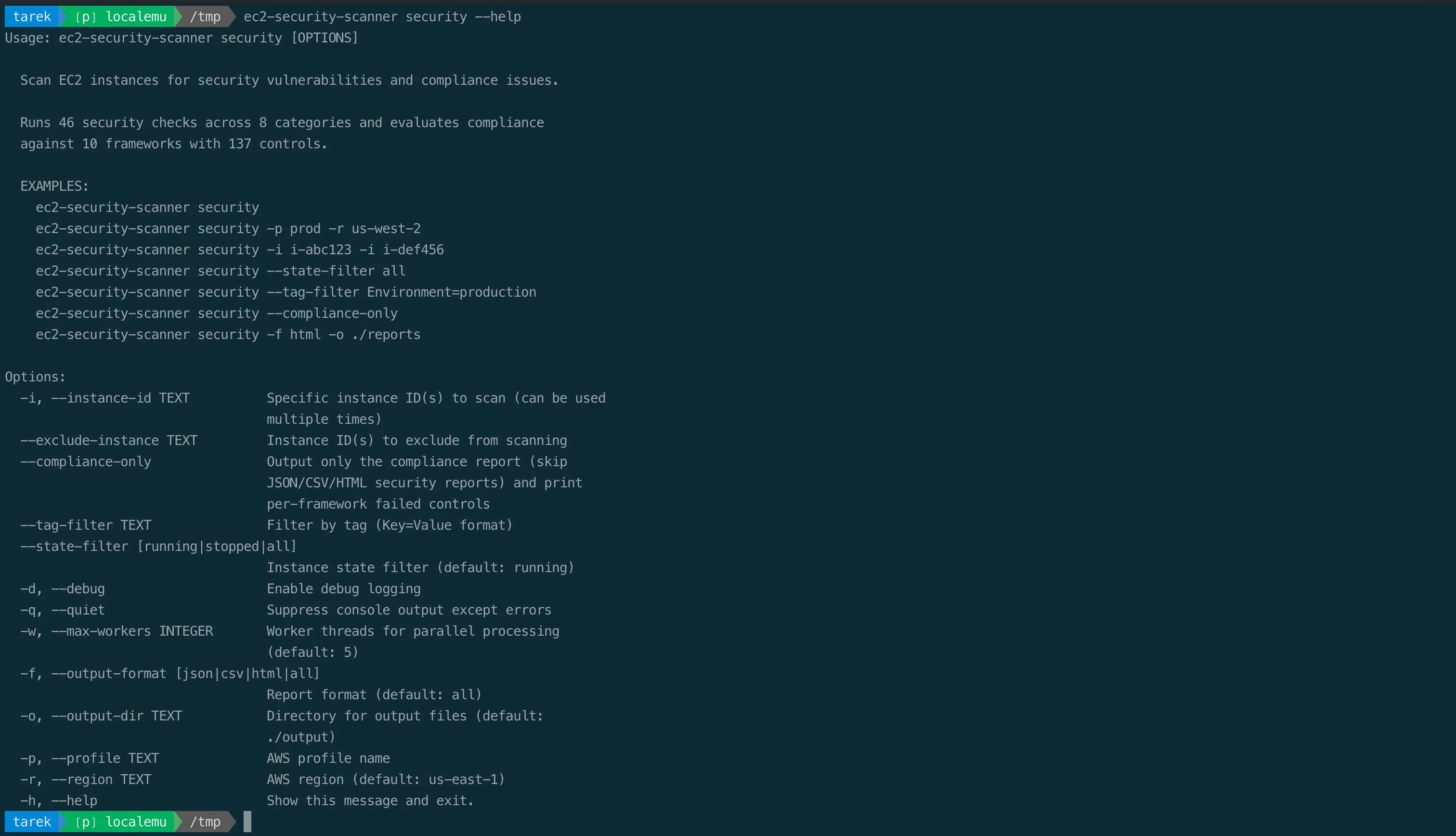
CLI Options
ec2-security-scanner security [OPTIONS]| Option | Default | What It Does |
|---|---|---|
-i, --instance-id | all | Scan specific instance(s) |
--exclude-instance | none | Skip specific instance(s) |
--tag-filter | none | Filter by tag (Key=Value) |
--state-filter | running | running, stopped, or all |
-r, --region | us-east-1 | AWS region to scan |
--compliance-only | off | Generate compliance report only |
-p, --profile | none | AWS CLI profile |
-o, --output-dir | ./output | Where to save reports |
-f, --output-format | all | json, csv, html, or all |
-w, --max-workers | 5 | Parallel threads |
-q, --quiet | off | Suppress console output |
-d, --debug | off | Debug logging |
Output
You get four files:
JSON: Full scan results. Every check, every instance, every detail. Feed it to your SIEM, pipe it to jq, store it in S3.
CSV: Spreadsheet-friendly. All key metrics and compliance status. For the people who live in Excel.
HTML: Interactive dashboard with Chart.js. Executive summary, score distribution chart, compliance overview, severity breakdown, sortable instance table, critical findings list. The one you show management.
Compliance JSON: Per-instance compliance evaluation. Pass/fail for every control across all 10 frameworks. The one you show auditors.
Scan files use the pattern ec2_scan_{region}_{timestamp}.{format}. The compliance report uses ec2_compliance_{region}_{timestamp}.json.
Quick Start
# Install
pip install ec2-security-scanner

# Scan all running instances in us-east-1
ec2-security-scanner security

# Scan specific instances
ec2-security-scanner security -i i-0123456789abcdef0

# Scan with a profile and region
ec2-security-scanner security -p production -r eu-west-1

# Only instances with specific tags
ec2-security-scanner security --tag-filter "Environment=production"

# Generate compliance report only
ec2-security-scanner security --compliance-only

# Scan stopped instances too
ec2-security-scanner security --state-filter all
What It Doesn't Do
It's read-only. Describe, List, Get. That's it.
Can't create. Can't modify. Can't delete. Can't access your data or read your volumes. All read-only permissions, no *:* in sight. Full IAM policy is in the README.
What's Next
In Part 3, we'll go through every finding category and show you exactly how to fix each issue, with AWS CLI commands, Terraform snippets, and console steps.
Because finding the problems is step one. Fixing them is the whole point.
Support the Project
The scanner is open source and built for the community. If it caught something real in your account, here is how to pay it forward:
- Star it on GitHub so more engineers can find it: github.com/TocConsulting/ec2-security-scanner
- Open a pull request if you fix a bug or tighten a check.
- Propose a new check or framework by opening an issue. Real-world gaps make the best feature requests.
- Share it with your team and your network. Visibility is what keeps an open-source security tool alive.
Cloud attacks are getting faster and more automated in the AI era. The more contributors and eyes on tools like this, the harder we make it for attackers. Every star, issue, and pull request pushes cloud security forward.
GitHub: github.com/TocConsulting/ec2-security-scanner | PyPI: pypi.org/project/ec2-security-scanner
Go Deeper: The State of AWS Security 2026
This article is just the start. Get the full picture with our free whitepaper - 8 chapters covering IAM, S3, VPC, monitoring, agentic AI security, compliance, and a prioritized action plan with 50+ CLI commands.
More Articles
Build a Free AWS Security Lab on Your Laptop with LocalEmu
Spin up a local AWS, plant deliberately insecure resources, and run real security scanners against it. No account, no token, no cost, no risk.
Fixing EC2 Security Issues: A Practical Remediation Guide
Part 3 of 3 in the EC2 Security Series. A hands-on remediation guide mapped to the scanner findings: AWS CLI commands, Terraform snippets, and console steps for every category.
Your EC2 Instances Are Probably Exposed Right Now
Part 1 of 3 in the EC2 Security Series. The real EC2 attack surface, from IMDSv1 and secrets in UserData to public snapshots, and the breaches that prove it matters.