
Inside lambda-security-scanner: 19 Checks Across Every Function in Your Account
Tarek Cheikh
Founder & AWS Cloud Architect
Part 2 of 4 in the Lambda Security Series
In Part 1, I described the gap. Lambda functions accumulate overprivileged roles, plaintext secrets, public endpoints, and deprecated runtimes, and none of it is visible until something goes wrong. Reviewing it by hand across every function and every region does not scale.
So I built a tool that does it for you. It is called lambda-security-scanner. It is open source, read-only, and it runs in one command.
One Command
Install it from PyPI:
pip install lambda-security-scannerThen scan:
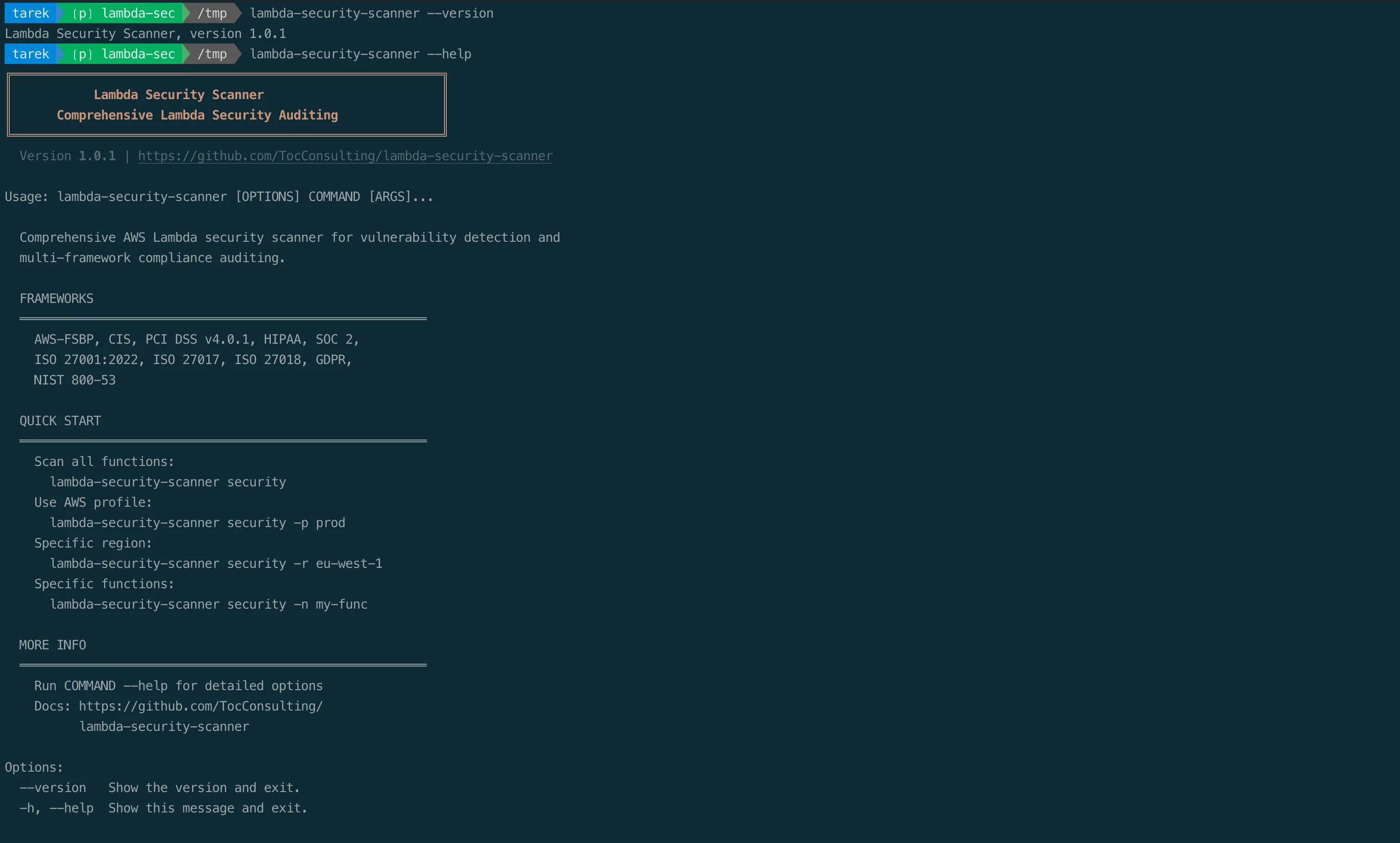
lambda-security-scanner securityThat runs nineteen checks across five categories against every Lambda function in the target region, scores each function from 0 to 100, maps the findings to ten compliance frameworks, and writes JSON, CSV, and an interactive HTML report. It needs Python 3.10 or higher and read-only AWS credentials.
What It Checks
The nineteen checks are grouped into five categories. Each check has an identifier so you can trace any finding back to exactly what was evaluated.
Category A: Function configuration
| ID | Check | What it catches |
|---|---|---|
| A.1 | Runtime status | Blocked, deprecated, or near end-of-life runtimes |
| A.2 | Maximum timeout | Functions configured with the 900-second maximum |
| A.3 | Environment secrets | Plaintext credentials in environment variables |
| A.4 | Large ephemeral storage | Ephemeral storage above the 512 MB default |
| A.5 | External layers | Lambda layers owned by other AWS accounts |
| A.6 | X-Ray tracing | Active tracing not enabled |
| A.7 | Dead letter queue | No DLQ configured |
Category B: Access control
| ID | Check | What it catches |
|---|---|---|
| B.1 | Resource policy public access | Wildcard principal or unscoped service invocation |
| B.2 | Function URL authentication | Function URL with AuthType: NONE |
| B.3 | Function URL CORS | CORS AllowOrigins containing * |
| B.4 | Execution role overprivilege | Admin access, service wildcards, or privilege escalation |
| B.5 | Shared execution role | One IAM role reused across multiple functions |
Category C: Network security
| ID | Check | What it catches |
|---|---|---|
| C.1 | VPC configuration | Function not attached to a VPC |
| C.2 | Multi-AZ deployment | VPC function in a single Availability Zone |
| C.3 | Security group egress | Unrestricted outbound (0.0.0.0/0 or ::/0) |
Category D: Logging and monitoring
| ID | Check | What it catches |
|---|---|---|
| D.1 | CloudWatch log group | Log group missing or no retention policy |
| D.2 | Reserved concurrency | No reserved concurrency configured |
Category E: Code and supply chain
| ID | Check | What it catches |
|---|---|---|
| E.1 | Code signing | No code signing config, or policy set to Warn instead of Enforce |
| E.2 | Event source mapping failures | An event source mapping without an OnFailure destination |
Two of these checks deserve a closer look, because they catch the issues that cause real breaches.
Secret Detection That Knows the Difference
Check A.3 is the one I am most careful about, because a naive secret scanner is worse than none. It floods you with false positives, you start ignoring it, and then it misses the one that matters.
The scanner works in two layers. First it looks at variable names against ten patterns that signal a secret: password, secret, api_key, auth_token, access_key, private_key, database_url, connection_string, credentials, and token. Then it looks at variable values against sixteen credential formats, including AWS access keys (AKIA and ASIA), GitHub personal access tokens (both ghp_ and the newer github_pat_ format), GitLab tokens, Stripe live and restricted keys, Slack bot and app tokens, PEM private key headers, database connection strings with embedded credentials, Anthropic keys, OpenAI standard, project, and service-account keys, SendGrid keys, and NPM tokens.
The important part is what it does not flag. If a variable named DB_PASSWORD holds a Secrets Manager ARN, an SSM parameter ARN, a KMS ARN, an SSM parameter path like /app/db/password, or a CloudFormation {{resolve:...}} dynamic reference, that is the AWS-recommended pattern. The scanner treats it as clean, not as a leaked secret. Trivial values such as booleans, ports, and environment names are ignored as well. The goal is to flag real plaintext credentials and stay quiet about correct configuration.
When a function does hold a plaintext secret, the severity depends on whether the function's environment variables are encrypted with a customer-managed KMS key. Without KMS, it is critical. With KMS, it is high, because the key adds a layer of access control but the secret still does not belong there.
Execution Roles, Examined in Depth
Check B.4 is the other one that matters most. It does not just look at the policies attached to a role by name. It reads every managed and inline policy on the execution role and evaluates what they actually grant.
It flags three distinct conditions, in order of severity. The most severe is admin-equivalent access: the AdministratorAccess, PowerUserAccess, or IAMFullAccess managed policies, or an inline statement that allows * on *. Next is a service-level wildcard, such as s3:* or dynamodb:*, which grants every action in a service. Last is privilege escalation: seventeen specific IAM and Lambda actions that let a role grant itself more power than it started with. These include iam:CreatePolicyVersion, iam:AttachRolePolicy, iam:PassRole, iam:CreateAccessKey, lambda:UpdateFunctionCode, and others from the well-documented IAM privilege escalation set. A role without literal admin can still reach admin through any one of them, and the scanner treats that as a high-severity finding rather than letting it hide.
Composite Findings
Some risks only exist as combinations. The scanner detects those explicitly:
| Finding | Trigger | Why it matters |
|---|---|---|
| Public with no concurrency | A public resource policy or function URL combined with no reserved concurrency | Anyone can invoke the function without limit, turning exposure into uncontrolled cost |
| Public URL with wildcard CORS | A public function URL combined with a wildcard CORS policy | Unauthenticated, cross-origin callable, and reachable from any website |
How Scoring Works
Every function starts at 100 points. Each finding subtracts a fixed deduction. The size of the deduction reflects how directly the issue leads to compromise.
The most severe findings are the ones that expose the function or its credentials:
- Public resource policy: minus 25
- Public function URL with no authentication: minus 25
- Plaintext secrets without KMS encryption: minus 20
- Admin-equivalent execution role: minus 20
- Blocked runtime: minus 15
High-severity findings cost ten points each: a deprecated runtime, a wildcard CORS policy, a service-level wildcard in the execution role, privilege escalation permissions, a shared execution role, and plaintext secrets that are at least KMS-encrypted.
Medium-severity findings cost five points each: a single-AZ VPC deployment, unrestricted security group egress, a missing or unretained log group, an event source mapping with no failure destination, and no code signing configuration.
Low-severity findings cost two or three points each: external layers, a function with no VPC, a near end-of-life runtime, a code signing policy set to Warn instead of Enforce, the maximum timeout, large ephemeral storage, disabled X-Ray tracing, no dead letter queue, and no reserved concurrency.
The final score is max(0, 100 - total deductions).
90 to 100   Excellent          Maintain current posture
70 to 89    Good               Address minor gaps
50 to 69    Needs improvement  Fix the significant risks
0 to 49     Poor               Immediate action required
A few checks have overlapping variants, and the scanner never double-counts them. Runtime status applies only the highest of blocked, deprecated, or near-EOL. The secret check applies only one of its two KMS variants. Code signing applies only one of no-config or Warn-policy. Within each of these groups, only the single highest deduction is taken.
How It Runs
The scanner analyzes functions in parallel with a thread pool, five workers by default, adjustable with a flag for accounts with many functions or tighter API rate limits. Each worker gets its own thread-local boto3 session, so there is no shared mutable client state across threads.
The work is split into five checker modules, one per category: function configuration, access control, network security, logging and monitoring, and code and supply chain. Checks that depend on other checks are handled in order. CORS is only evaluated when a function URL exists, and the multi-AZ and egress checks only run when the function is actually attached to a VPC. If a function is not in a VPC, the network checks that do not apply are skipped rather than penalized.
One design choice matters for trust: an AccessDenied error on a single function does not crash the scan and does not silently pass the function. The error is surfaced as a finding. A scan that could not read something tells you so, instead of reporting a clean result it did not actually verify.
What You Get Back
The scanner writes four artifacts to the output directory:
- A JSON report with a summary block (scan time, region, account ID, function count, average score) and a per-function results array. This is the one to feed into a SIEM or archive in S3.
- A CSV report with one row per function and its compliance status, for spreadsheets and quick filtering.
- An interactive HTML dashboard with score distribution, a compliance overview across all ten frameworks, a severity breakdown, a sortable function table, and a critical findings list. This is the one to show to people who do not live in a terminal.
- A per-function compliance report in JSON, generated on every run regardless of the chosen output format.
The Options You Will Actually Use
lambda-security-scanner security [OPTIONS]| Option | Default | Purpose |
|---|---|---|
-n, --function-name | all | Scan only the named function or functions |
--exclude-function | none | Skip the named function or functions |
-r, --region | us-east-1 | Target AWS region |
-p, --profile | none | AWS CLI profile to use |
-o, --output-dir | ./output | Where reports are written |
-f, --output-format | all | json, csv, html, or all |
-w, --max-workers | 5 | Number of parallel worker threads |
--compliance-only | off | Produce only the compliance report |
-q, --quiet | off | Suppress console output except errors, for CI |
-d, --debug | off | Verbose logging |
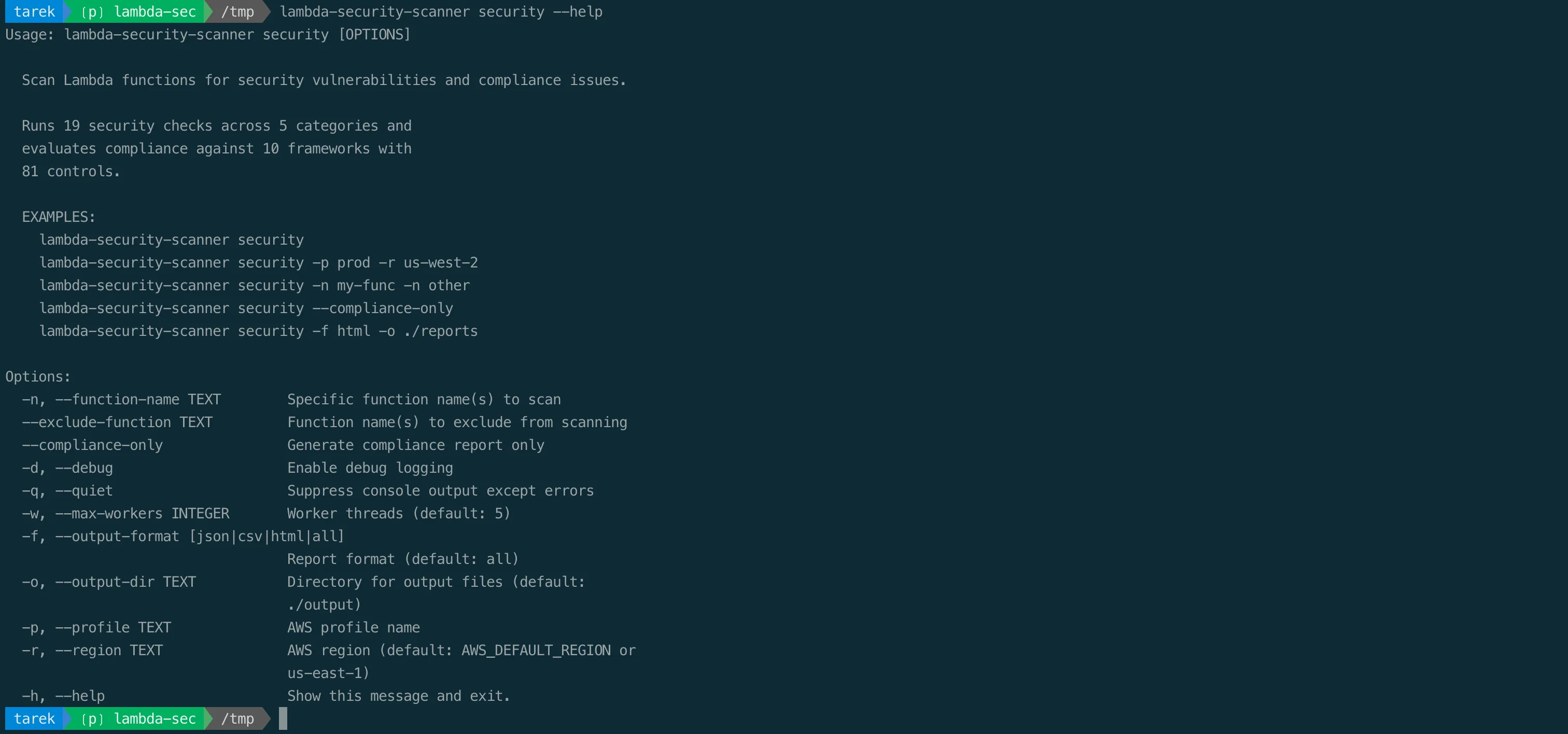
A few combinations come up constantly:
# Scan two specific functions in another region
lambda-security-scanner security -n my-api -n my-worker -r eu-west-1

# Quiet JSON output for a CI pipeline
lambda-security-scanner security -f json -q

# Compliance posture only, against a named profile
lambda-security-scanner security --compliance-only -p production
It Is Strictly Read-Only
The scanner cannot change anything in your account. It calls only List, Get, and Describe style operations. It cannot modify functions, cannot invoke them, cannot read your function code, and cannot decrypt your secrets. The full permission set is read-only across Lambda, IAM, EC2, and CloudWatch Logs:
{
  "Version": "2012-10-17",
  "Statement": [{
    "Effect": "Allow",
    "Action": [
      "lambda:ListFunctions",
      "lambda:GetFunctionConfiguration",
      "lambda:GetPolicy",
      "lambda:GetFunctionUrlConfig",
      "lambda:GetFunctionCodeSigningConfig",
      "lambda:GetCodeSigningConfig",
      "lambda:GetFunctionConcurrency",
      "lambda:ListEventSourceMappings",
      "iam:ListAttachedRolePolicies",
      "iam:GetPolicy",
      "iam:GetPolicyVersion",
      "iam:ListRolePolicies",
      "iam:GetRolePolicy",
      "ec2:DescribeSubnets",
      "ec2:DescribeSecurityGroups",
      "logs:DescribeLogGroups",
      "sts:GetCallerIdentity"
    ],
    "Resource": "*"
  }]
}
There is no lambda:* and no write action anywhere in that policy. You can hand it to the scanner and know it cannot touch production.
Running It in Docker
If you would rather not install Python locally, the scanner ships as a multi-architecture image for amd64 and arm64:
docker run --rm \
  -v ~/.aws:/root/.aws:ro \
  -v $(pwd)/output:/app/output \
  tarekcheikh/lambda-security-scanner:latest \
  security --region us-east-1
Mount your AWS credentials read-only, mount a local directory for the reports, and the container does the rest. Credentials can also be passed as environment variables for assumed-role and CI scenarios.
What's Next
You now have a number for every function and a list of exactly what is wrong with each one. In Part 3, we turn those findings into two things auditors and engineers both need: a mapping from each finding to the compliance controls it satisfies or violates across ten frameworks, and the precise AWS CLI commands that fix every one of the nineteen checks.
Sources
The project is open source under the MIT license:
Go Deeper: The State of AWS Security 2026
This article is just the start. Get the full picture with our free whitepaper - 8 chapters covering IAM, S3, VPC, monitoring, agentic AI security, compliance, and a prioritized action plan with 50+ CLI commands.
Toc Consulting: AWS Security & Cloud Architecture
Want expert help with AWS Security?
Our team helps engineering teams secure and architect AWS the right way: assessment in week one, a prioritized action plan in week two.
More Articles
The Code Is Still Yours: Application-Layer Security for AWS Lambda
Part 4 of 4 in the Lambda Security Series. The half no posture scanner reaches: event-data injection, stealable execution-role credentials, insecure deserialization, dependency and code scanning, runtime secrets, and detection.
From Findings to Fixed: Lambda Compliance Mapping and Remediation
Part 3 of 4 in the Lambda Security Series. Map every Lambda security finding to ten compliance frameworks (PCI DSS, HIPAA, SOC 2, ISO 27001, NIST, GDPR), then fix each of the 19 checks with a precise AWS CLI command.
Build a Free AWS Security Lab on Your Laptop with LocalEmu
Spin up a local AWS, plant deliberately insecure resources, and run real security scanners against it. No account, no token, no cost, no risk.